TOP Game
  Game Mobile
  Game PC
  Code game
  Cách chơi Game
  Mẹo vặt
  Anime Manga
  Liên Minh Huyền Thoại
  Đấu Trường Chân Lý
  Call Of Duty
  Coin Master
 Hướng dẫn sử dụng Gemini AI làm game Oẳn tù tì
Với Gemini AI, bạn hoàn toàn có thể biến những ý tưởng đơn giản như trò chơi Oẳn tù tì hay Bao búa kéo thành một trải nghiệm tương tác cực kỳ thú vị.
Trong hướng dẫn dưới đây, GameVui sẽ chỉ cho bạn từng bước để tạo ra một phiên bản Oẳn tù tì chạy bằng Gemini AI, dễ làm, dễ hiểu và cực kỳ thú vị để bạn đem khoe bạn bè. Sẵn sàng chưa? Bắt đầu thôi!
Cách sử dụng Gemini AI làm game Oẳn tù tì
Bước 1: Trước tiên, bạn hãy mở ứng dụng Gemini AI lên rồi nhập Prompt sau để nó tạo game Oẳn tù tì
hãy tạo một game oẳn tù tì (bao búa kéo) đơn giản có 2 bàn tay 5 ngón trên màn hình và các biểu tượng bao, búa kéo để chọn với luật chơi kéo thắng bao, bao thắng búa, búa lại thắng kéo, còn nếu ra biểu tượng giống nhau thì hòaBước 2: Sau đó, Gemini AI sẽ phân tích Prompt của bạn rồi tạo một đoạn code, bạn sao chép đoạn code về máy tính với đuôi html rồi chơi thử.
<!DOCTYPE html>
<html lang="vi">
<head>
    <meta charset="UTF-8">
    <meta name="viewport" content="width=device-width, initial-scale=1.0, maximum-scale=1.0, user-scalable=no">
    <title>Trò Chơi Oẳn Tù Tì</title>
    <style>
        /* Font chuẩn và loại bỏ scroll bar */
        @import url('https://fonts.googleapis.com/css2?family=Inter:wght@400;700&display=swap');

        * {
            margin: 0;
            padding: 0;
            box-sizing: border-box;
            font-family: 'Inter', sans-serif;
        }

        body {
            width: 100vw;
            height: 100vh;
            overflow: hidden; /* Không hiện thanh cuộn */
            background: linear-gradient(135deg, #f5f7fa 0%, #c3cfe2 100%);
            display: flex;
            flex-direction: column;
            align-items: center;
            justify-content: center;
        }

        .game-container {
            text-align: center;
            width: 100%;
            max-width: 600px;
            padding: 20px;
        }

        h1 {
            color: #2d3436;
            margin-bottom: 30px;
            text-transform: uppercase;
            letter-spacing: 2px;
        }

        .display-area {
            display: flex;
            justify-content: space-around;
            align-items: center;
            margin-bottom: 50px;
        }

        .hand {
            font-size: 80px;
            transition: transform 0.2s ease-in-out;
            display: flex;
            flex-direction: column;
            align-items: center;
        }

        .hand span {
            font-size: 18px;
            margin-top: 10px;
            color: #636e72;
            font-weight: bold;
        }

        #player-hand { transform: scaleX(-1); } /* Đảo chiều bàn tay người chơi */

        .result-text {
            height: 40px;
            font-size: 24px;
            font-weight: bold;
            color: #d63031;
            margin-bottom: 30px;
        }

        .controls {
            display: flex;
            justify-content: center;
            gap: 20px;
        }

        button {
            padding: 15px 25px;
            font-size: 18px;
            cursor: pointer;
            border: none;
            border-radius: 12px;
            background-color: #fff;
            box-shadow: 0 4px 6px rgba(0,0,0,0.1);
            transition: all 0.2s;
        }

        button:hover {
            transform: translateY(-3px);
            box-shadow: 0 6px 12px rgba(0,0,0,0.15);
            background-color: #0984e3;
            color: white;
        }

        button:active {
            transform: translateY(0);
        }

        /* Hiệu ứng rung khi oẳn tù tì */
        .shake {
            animation: shakeHand 0.5s ease-in-out;
        }

        @keyframes shakeHand {
            0%, 100% { transform: translateY(0) scaleX(-1); }
            25% { transform: translateY(-20px) scaleX(-1); }
            50% { transform: translateY(0) scaleX(-1); }
            75% { transform: translateY(-20px) scaleX(-1); }
        }

        @keyframes shakeBot {
            0%, 100% { transform: translateY(0); }
            25% { transform: translateY(-20px); }
            50% { transform: translateY(0); }
            75% { transform: translateY(-20px); }
        }

        .shake-bot { animation: shakeBot 0.5s ease-in-out; }
    </style>
</head>
<body>

    <div class="game-container">
        <h1>Oẳn Tù Tì</h1>

        <div class="display-area">
            <div class="hand" id="player-hand">
                <div id="p-emoji">🖐️</div>
                <span>BẠN</span>
            </div>
            <div class="hand" id="bot-hand">
                <div id="b-emoji">🖐️</div>
                <span>MÁY</span>
            </div>
        </div>

        <div class="result-text" id="result">Chọn một quân bài!</div>

        <div class="controls">
            <button onclick="playGame('búa')">🔨 Búa</button>
            <button onclick="playGame('bao')">🖐️ Bao</button>
            <button onclick="playGame('kéo')">✌️ Kéo</button>
        </div>
    </div>

    <script>
        const emojis = {
            'búa': '✊',
            'bao': '🖐️',
            'kéo': '✌️'
        };

        function playGame(playerChoice) {
            const choices = ['búa', 'bao', 'kéo'];
            const botChoice = choices[Math.floor(Math.random() * 3)];

            const pHand = document.getElementById('player-hand');
            const bHand = document.getElementById('bot-hand');
            const pEmoji = document.getElementById('p-emoji');
            const bEmoji = document.getElementById('b-emoji');
            const resultEl = document.getElementById('result');

            // Hiệu ứng chuẩn bị
            pEmoji.innerText = '✊';
            bEmoji.innerText = '✊';
            pHand.classList.add('shake');
            bHand.classList.add('shake-bot');
            resultEl.innerText = 'Oẳn tù tì...';

            setTimeout(() => {
                pHand.classList.remove('shake');
                bHand.classList.remove('shake-bot');

                pEmoji.innerText = emojis[playerChoice];
                bEmoji.innerText = emojis[botChoice];

                let result = '';
                if (playerChoice === botChoice) {
                    result = 'HÒA NHAU! 🤝';
                } else if (
                    (playerChoice === 'kéo' && botChoice === 'bao') ||
                    (playerChoice === 'bao' && botChoice === 'búa') ||
                    (playerChoice === 'búa' && botChoice === 'kéo')
                ) {
                    result = 'BẠN THẮNG! 🎉';
                } else {
                    result = 'MÁY THẮNG! 🤖';
                }

                resultEl.innerText = result;
            }, 500);
        }
    </script>
</body>
</html>
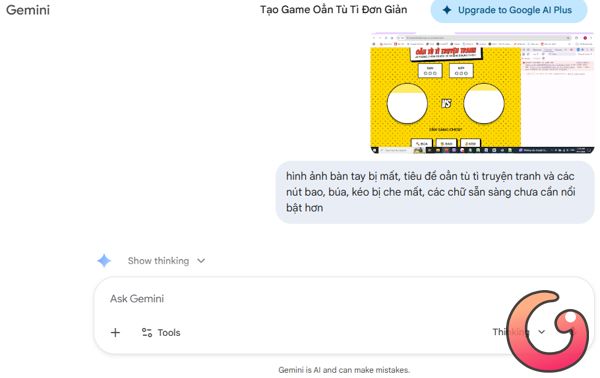
Bước 3: Bạn có thể tải hình ảnh bàn tay trên mạng rồi bảo Gemini AI mô phỏng theo hình ảnh đó trong game đồng thời nâng cấp thêm cho game bằng Prompt sau
hãy sử dụng hình ảnh bàn tay mà tôi tải lên làm hình ảnh trong game, thêm backround nổi bật hơn, bổ sung cơ chế ai thắng 3 ván trước sẽ thắng cuối cùngBước 4: Bạn có thể sẽ gặp phải 1 số lỗi như hình ảnh bàn tay không hiển thị hãy sửa font chữ bị lỗi, bạn hãy nhập lệnh cho Gemini tiếp tục chỉnh sửa đến khi hoàn thiện.
Bài viết liên quan


Bài viết mới nhất


Game PC
-

Plants vs Brainrots: Cách tham gia sự kiện Gran Snomancello
-
Hướng dẫn tải Câu Cá Vạn Cân miễn phí trên PC
-
Chi tiết kỹ năng của từng nhân vật trong Valorant
-
Mẹo cứu những chú hươu trong 99 Nights in the Forest
-
Nếu muốn giành top 1 ĐTCL, game thủ cần sở hữu những món đồ này ở cuối trận
-
99 Nights in the Forest: Bạn biết gì về Christmas Elf Shop