TOP Game
  Game Mobile
  Game PC
  Code game
  Cách chơi Game
  Mẹo vặt
  Anime Manga
  Liên Minh Huyền Thoại
  Đấu Trường Chân Lý
  Call Of Duty
  Coin Master
 Cách làm game Vua Tiếng Việt bằng Grok AI
Bạn đã bao giờ nghĩ rằng mình có thể tự tay làm ra một phiên bản Vua Tiếng Việt theo phong cách riêng chưa? Bạn không cần phải là lập trình viên chuyên nghiệp, cũng chẳng cần hiểu sâu về AI phức tạp, chỉ với một chút sáng tạo và sự trợ giúp của Grok AI, mọi thứ trở nên dễ dàng hơn bạn tưởng.
Dưới đây, GameVui sẽ hướng dẫn từng bước tạo game Vua Tiếng Việt bằng Grok AI để bạn có thể tạo ra phiên bản của riêng mình. Hãy tham khảo nhé.
Ngoài ra, bạn có thể xem thêm cách tạo game cờ Caro bằng Gemini AI trên GameVui
Hướng dẫn tạo game Vua Tiếng Việt với Grok AI
Bước 1: Trước tiên, bạn hãy mở ứng dụng Grok AI rồi nhập lệnh tạo Prompt như sau
hãy viết promt tạo game vua tiếng Việt màn hình ngang dựa trên các chữ cái được sắp xếp lộn xộn, trò chơi gồm khoảng 10 câu, mỗi câu tính 1 điểm, người chơi sẽ viết câu trả lời của mình vào ô trống, thời gian đếm ngược 10 giâyBước 2: Sau đó, Grok AI sẽ viết cho bạn một Prompt để bạn có thể làm ra một game Vua Tiếng Việt
Bạn là một lập trình viên game chuyên nghiệp. Hãy tạo một trò chơi web HTML5 + CSS + JavaScript hoàn chỉnh với tên là "VUA TIẾNG VIỆT".
Yêu cầu chi tiết của game:

Thể loại: Sắp xếp lại chữ cái lộn xộn để tạo thành từ/cụm từ/câu tiếng Việt đúng.
Màn hình: Ngang (landscape) – tỷ lệ khuyến nghị 16:9 hoặc 1280x720.
Số lượng câu hỏi: Tổng cộng 10 câu, mỗi câu đúng được 1 điểm.
Cơ chế chơi:

  * Mỗi màn hình hiển thị một bộ chữ cái bị xáo trộn (các ô chữ cái có thể kéo thả hoặc click để sắp xếp).
  * Dưới cùng có một ô trống dài (input box) để người chơi gõ trực tiếp câu trả lời (không cần kéo thả chữ cái).
  * Có nút "Kiểm tra" và nút "Gợi ý" (gợi ý tiêu hao thời gian hoặc điểm).
  * Thời gian đếm ngược: 10 giây cho mỗi câu. Khi hết giờ tự động chuyển sang câu tiếp theo.
  * Hiển thị thời gian đếm ngược rõ ràng, to, màu sắc thay đổi khi còn dưới 3 giây (ví dụ: đỏ).
Giao diện:

Nền game mang phong cách hiện đại, vui tươi, chủ đề tiếng Việt (có thể dùng màu cờ đỏ vàng nhẹ nhàng hoặc tone xanh lá – vàng).
Phía trên: Logo "VUA TIẾNG VIỆT", điểm số hiện tại (0/10), tiến trình (câu 1/10).
Giữa màn hình:

  * Phần chữ cái lộn xộn (hiển thị đẹp, có animation khi xáo trộn).
  * Dòng chữ gợi ý nhỏ (ví dụ: "Đây là một thành phố lớn ở miền Bắc" hoặc "Tên một loại trái cây").

Phía dưới: Ô nhập câu trả lời lớn + nút "Kiểm tra" + nút "Bỏ qua".
Có hiệu ứng âm thanh vui (đúng/sai) và confetti khi trả lời đúng.

Quy tắc chấm điểm:

Người chơi gõ đúng chính tả và đầy đủ câu → +1 điểm.
Sai hoặc hết giờ → 0 điểm cho câu đó, hiển thị đáp án đúng.
Sau 10 câu sẽ hiện bảng kết quả cuối cùng với điểm số, đánh giá (Ví dụ: "Bạn là Vua Tiếng Việt!" nếu 8-10 điểm).

Chức năng bổ sung:

Nút "Chơi lại" sau khi kết thúc.
Hỗ trợ mobile (chạm để nhập).
Phông chữ đẹp, dễ đọc (có thể dùng Google Font "Roboto" hoặc font tiếng Việt đẹp như "Nunito", "Merriweather").
Toàn bộ code phải chạy độc lập trong 1 file HTML (hoặc tách thành index.html, style.css, script.js nếu cần).

Hãy viết toàn bộ code (HTML + CSS + JavaScript) cho trò chơi này, đảm bảo chạy mượt mà, đẹp mắt và thân thiện với người dùng Việt Nam.
Bắt đầu viết code ngay bây giờ.
Bước 3: Bạn chỉ cần sao chép Prompt này vào Grok AI, nó sẽ phân tích Prompt và trả về cho bạn đoạn code dưới đây
<!DOCTYPE html>
<html lang="vi">
<head>
<meta charset="UTF-8">
<title>VUA TIẾNG VIỆT</title>
<meta name="viewport" content="width=device-width, initial-scale=1.0, maximum-scale=1.0, user-scalable=no">
<style>
    @import url('https://fonts.googleapis.com/css2?family=Be+Vietnam+Pro:wght@400;600;700&display=swap');

    :root {
        --primary: #ffcc00;
        --accent: #c8102e;
    }

    * { margin:0; padding:0; box-sizing:border-box; }
    body {
        font-family: 'Be Vietnam Pro', sans-serif;
        background: linear-gradient(135deg, #c8102e, #ffcc00);
        color: #fff;
        height: 100vh;
        overflow: hidden;
        display: flex;
        align-items: center;
        justify-content: center;
    }

    #game {
        width: 100%;
        max-width: 1280px;
        height: 720px;
        background: rgba(255,255,255,0.95);
        color: #333;
        border-radius: 20px;
        box-shadow: 0 10px 40px rgba(0,0,0,0.3);
        overflow: hidden;
        display: flex;
        flex-direction: column;
    }

    header {
        background: linear-gradient(to right, #c8102e, #ffcc00);
        color: white;
        padding: 15px 30px;
        display: flex;
        justify-content: space-between;
        align-items: center;
        font-size: 1.4rem;
    }

    .logo {
        font-size: 2rem;
        font-weight: 700;
        text-shadow: 2px 2px 4px rgba(0,0,0,0.3);
    }

    .score {
        font-size: 1.5rem;
        font-weight: 600;
    }

    .progress {
        font-size: 1.2rem;
    }

    main {
        flex: 1;
        padding: 30px;
        display: flex;
        flex-direction: column;
        gap: 25px;
    }

    .scrambled {
        display: flex;
        flex-wrap: wrap;
        gap: 12px;
        justify-content: center;
        min-height: 120px;
    }

    .letter {
        width: 55px;
        height: 55px;
        background: #fff;
        border: 3px solid #ffcc00;
        border-radius: 12px;
        display: flex;
        align-items: center;
        justify-content: center;
        font-size: 2rem;
        font-weight: 700;
        color: #c8102e;
        box-shadow: 0 4px 8px rgba(0,0,0,0.15);
        transition: all 0.2s;
        cursor: grab;
    }

    .letter:active { transform: scale(1.1); }

    .hint {
        text-align: center;
        font-size: 1.3rem;
        color: #c8102e;
        font-weight: 600;
        min-height: 50px;
    }

    .timer {
        text-align: center;
        font-size: 3.5rem;
        font-weight: 700;
        color: #c8102e;
        transition: color 0.3s;
    }

    .timer.low { color: #ff0000; animation: pulse 0.8s infinite; }

    @keyframes pulse {
        0%, 100% { transform: scale(1); }
        50% { transform: scale(1.08); }
    }

    .input-area {
        display: flex;
        gap: 15px;
        align-items: center;
    }

    #answer {
        flex: 1;
        padding: 18px 25px;
        font-size: 1.5rem;
        border: 3px solid #ffcc00;
        border-radius: 50px;
        outline: none;
        font-family: 'Be Vietnam Pro', sans-serif;
    }

    button {
        padding: 15px 30px;
        font-size: 1.3rem;
        font-weight: 600;
        border: none;
        border-radius: 50px;
        cursor: pointer;
        transition: all 0.2s;
    }

    #checkBtn {
        background: #c8102e;
        color: white;
    }

    #hintBtn, #skipBtn {
        background: #666;
        color: white;
    }

    #checkBtn:hover { background: #a00; transform: translateY(-3px); }
    #hintBtn:hover, #skipBtn:hover { background: #444; }

    .result {
        position: fixed;
        top: 0; left: 0; right: 0; bottom: 0;
        background: rgba(0,0,0,0.85);
        display: none;
        align-items: center;
        justify-content: center;
        z-index: 100;
    }

    .result-box {
        background: white;
        color: #333;
        padding: 50px 60px;
        border-radius: 25px;
        text-align: center;
        max-width: 500px;
        box-shadow: 0 15px 40px rgba(0,0,0,0.4);
    }

    .final-score {
        font-size: 4rem;
        font-weight: 700;
        color: #c8102e;
        margin: 15px 0;
    }

    canvas#confetti {
        position: fixed;
        top: 0; left: 0;
        width: 100%; height: 100%;
        pointer-events: none;
        z-index: 200;
    }
</style>
</head>
<body>

<div id="game">
    <header>
        <div class="logo">👑 VUA TIẾNG VIỆT</div>
        <div>
            <span class="score">Điểm: <span id="score">0</span>/10</span>
            <span class="progress">Câu <span id="current">1</span>/10</span>
        </div>
    </header>

    <main>
        <div class="timer" id="timer">10</div>

        <div class="hint" id="hint"></div>

        <div class="scrambled" id="scrambled"></div>

        <div class="input-area">
            <input type="text" id="answer" placeholder="Nhập câu trả lời của bạn..." autocomplete="off">
            <button id="checkBtn">Kiểm tra</button>
            <button id="hintBtn">Gợi ý</button>
            <button id="skipBtn">Bỏ qua</button>
        </div>
    </main>
</div>

<div class="result" id="resultScreen">
    <div class="result-box">
        <h1>Kết quả trò chơi</h1>
        <div class="final-score" id="finalScore">8/10</div>
        <p id="message" style="font-size:1.5rem; margin:20px 0;"></p>
        <button onclick="restartGame()" style="background:#c8102e; color:white; padding:15px 40px; font-size:1.4rem; border-radius:50px;">Chơi lại</button>
    </div>
</div>

<canvas id="confetti"></canvas>

<script>
// ==================== DỮ LIỆU CÂU HỎI ====================
const questions = [
    {
        scrambled: "HÀ NỘI",
        answer: "Hà Nội",
        hint: "Thủ đô của Việt Nam"
    },
    {
        scrambled: "SÀI GÒN",
        answer: "Sài Gòn",
        hint: "Tên cũ của TP. Hồ Chí Minh"
    },
    {
        scrambled: "PHỞ BÒ",
        answer: "Phở bò",
        hint: "Món ăn nổi tiếng nhất Việt Nam"
    },
    {
        scrambled: "CÀ PHÊ SỮA ĐÁ",
        answer: "Cà phê sữa đá",
        hint: "Đồ uống Việt Nam được yêu thích toàn thế giới"
    },
    {
        scrambled: "VIỆT NAM",
        answer: "Việt Nam",
        hint: "Quốc gia hình chữ S"
    },
    {
        scrambled: "BÁNH MÌ",
        answer: "Bánh mì",
        hint: "Món ăn đường phố được CNN bình chọn ngon nhất thế giới"
    },
    {
        scrambled: "HỒ CHÍ MINH",
        answer: "Hồ Chí Minh",
        hint: "Tên vị lãnh tụ vĩ đại của dân tộc"
    },
    {
        scrambled: "TRÁI CÂY",
        answer: "Trái cây",
        hint: "Thực phẩm tươi ngon từ thiên nhiên"
    },
    {
        scrambled: "NÚI NON",
        answer: "Núi non",
        hint: "Cảnh quan thiên nhiên hùng vĩ của Việt Nam"
    },
    {
        scrambled: "RỒNG TIÊN",
        answer: "Rồng Tiên",
        hint: "Con cháu của dân tộc Việt Nam"
    }
];

// ==================== BIẾN TOÀN CỤC ====================
let currentQuestion = 0;
let score = 0;
let timeLeft = 10;
let timerInterval = null;
let usedHints = 0;

// Canvas confetti
const canvas = document.getElementById('confetti');
const ctx = canvas.getContext('2d');
let confettiParticles = [];

// ==================== KHỞI TẠO GAME ====================
function initGame() {
    currentQuestion = 0;
    score = 0;
    document.getElementById('score').textContent = score;
    loadQuestion();
}

function loadQuestion() {
    const q = questions[currentQuestion];

    document.getElementById('current').textContent = currentQuestion + 1;
    document.getElementById('hint').textContent = q.hint;

    // Xáo trộn chữ cái
    const lettersContainer = document.getElementById('scrambled');
    lettersContainer.innerHTML = '';

    let letters = q.scrambled.replace(/\s+/g, '').split('');
    // Xáo trộn mảng
    for (let i = letters.length - 1; i > 0; i--) {
        const j = Math.floor(Math.random() * (i + 1));
        [letters[i], letters[j]] = [letters[j], letters[i]];
    }

    letters.forEach(letter => {
        const div = document.createElement('div');
        div.className = 'letter';
        div.textContent = letter;
        lettersContainer.appendChild(div);
    });

    // Reset input
    document.getElementById('answer').value = '';
    document.getElementById('answer').focus();

    // Reset timer
    timeLeft = 10;
    document.getElementById('timer').textContent = timeLeft;
    document.getElementById('timer').classList.remove('low');

    clearInterval(timerInterval);
    timerInterval = setInterval(countdown, 1000);
}

function countdown() {
    timeLeft--;
    const timerEl = document.getElementById('timer');
    timerEl.textContent = timeLeft;

    if (timeLeft <= 3) {
        timerEl.classList.add('low');
    }

    if (timeLeft <= 0) {
        clearInterval(timerInterval);
        showCorrectAnswer();
    }
}

function checkAnswer() {
    clearInterval(timerInterval);
    const userAnswer = document.getElementById('answer').value.trim();
    const correctAnswer = questions[currentQuestion].answer;

    if (userAnswer.toLowerCase() === correctAnswer.toLowerCase()) {
        score++;
        document.getElementById('score').textContent = score;
        launchConfetti();
        nextQuestion(true);
    } else {
        showCorrectAnswer();
    }
}

function showCorrectAnswer() {
    const q = questions[currentQuestion];
    alert(`⏰ Hết giờ!\n\nĐáp án đúng là:\n"${q.answer}"\n\nBạn đã trả lời: "${document.getElementById('answer').value || '(không trả lời)'}"`);
    nextQuestion(false);
}

function nextQuestion(wasCorrect) {
    currentQuestion++;

    if (currentQuestion >= questions.length) {
        endGame();
    } else {
        setTimeout(loadQuestion, 800);
    }
}

function endGame() {
    clearInterval(timerInterval);
    const percentage = Math.round((score / 10) * 100);
    let message = '';

    if (score >= 9) message = "🎉 Bạn là VUA TIẾNG VIỆT thực thụ!";
    else if (score >= 7) message = "🌟 Rất xuất sắc! Bạn gần như là Vua rồi!";
    else if (score >= 5) message = "👍 Khá tốt! Tiếp tục luyện tập nhé!";
    else message = "💪 Cố lên! Lần sau bạn sẽ làm tốt hơn.";

    document.getElementById('finalScore').textContent = `${score}/10`;
    document.getElementById('message').innerHTML = message;
    document.getElementById('resultScreen').style.display = 'flex';
}

// Confetti (đơn giản nhưng đẹp)
class Particle {
    constructor() {
        this.x = Math.random() * canvas.width;
        this.y = Math.random() * canvas.height - canvas.height;
        this.size = Math.random() * 12 + 6;
        this.speed = Math.random() * 6 + 4;
        this.angle = Math.random() * 360;
        this.color = ['#c8102e', '#ffcc00', '#ffffff', '#00ff00'][Math.floor(Math.random()*4)];
        this.rotationSpeed = Math.random() * 0.2 - 0.1;
    }

    update() {
        this.y += this.speed;
        this.angle += this.rotationSpeed;
    }

    draw() {
        ctx.save();
        ctx.translate(this.x, this.y);
        ctx.rotate(this.angle * Math.PI / 180);
        ctx.fillStyle = this.color;
        ctx.fillRect(-this.size/2, -this.size/2, this.size, this.size);
        ctx.restore();
    }
}

function launchConfetti() {
    confettiParticles = [];
    for (let i = 0; i < 150; i++) {
        confettiParticles.push(new Particle());
    }

    // Chạy animation confetti ngắn
    let count = 0;
    const confettiAnim = setInterval(() => {
        ctx.clearRect(0, 0, canvas.width, canvas.height);
        confettiParticles.forEach((p, i) => {
            p.update();
            p.draw();
            if (p.y > canvas.height) confettiParticles.splice(i, 1);
        });
        count++;
        if (count > 80) {
            clearInterval(confettiAnim);
            ctx.clearRect(0, 0, canvas.width, canvas.height);
        }
    }, 16);
}

// ==================== EVENT LISTENERS ====================
document.getElementById('checkBtn').addEventListener('click', checkAnswer);

document.getElementById('hintBtn').addEventListener('click', () => {
    if (usedHints < 2) {
        alert("💡 Gợi ý: Hãy nghĩ đến từ liên quan đến " + questions[currentQuestion].hint.toLowerCase());
        usedHints++;
    } else {
        alert("Bạn đã dùng hết gợi ý!");
    }
});

document.getElementById('skipBtn').addEventListener('click', () => {
    if (confirm("Bạn muốn bỏ qua câu này?")) {
        clearInterval(timerInterval);
        showCorrectAnswer();
    }
});

document.getElementById('answer').addEventListener('keypress', (e) => {
    if (e.key === 'Enter') checkAnswer();
});

// Resize canvas
function resizeCanvas() {
    canvas.width = window.innerWidth;
    canvas.height = window.innerHeight;
}
window.addEventListener('resize', resizeCanvas);
resizeCanvas();

// ==================== KHỞI ĐỘNG ====================
function restartGame() {
    document.getElementById('resultScreen').style.display = 'none';
    initGame();
}

// Bắt đầu game
window.onload = initGame;
</script>
</body>
</html>
Bước 4: Bạn hãy lưu đoạn code trên có đuôi html (ví dụ là index.html). Tiếp theo, bạn hãy click chuột phải vào file này rồi chọn Open With/Google Chrome để mở lên chơi thử.
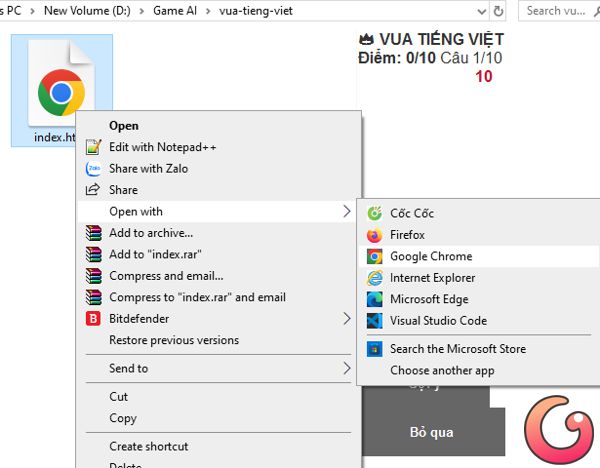
Bước 5: Trong quá trình mới tạo game, bạn có thể gặp một số lỗi như không hiển thị số thứ tự của câu hỏi hay các nút chức năng bị che khuất trên màn hình, bạn hãy nhập lệnh vào Grok AI để nó sửa lại cho chính xác.
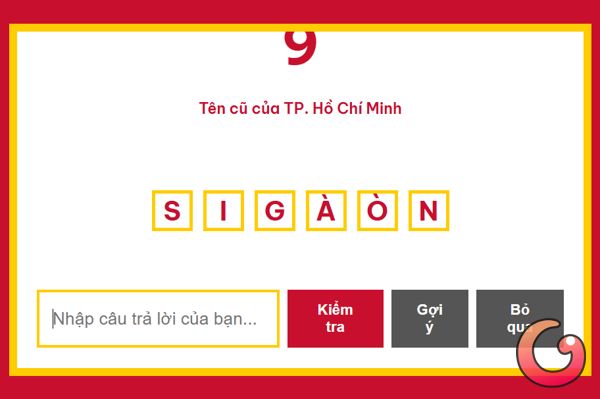
Video hướng dẫn làm game Vua Tiếng Việt bằng Grok AI
Bài viết liên quan


Bài viết mới nhất






Game AI
-

Hướng dẫn làm game Ai là triệu phú bằng Claude AI
-
Hướng dẫn tạo game Trắc nghiệm lịch sử Việt Nam với Gemini AI
-
Hướng dẫn tạo game trắc nghiệm Cúp bóng đá thế giới 2026 nhanh chóng
-
Cách tạo game Bi-a 8 bóng bằng Meta AI
-
Hướng dẫn làm game Pacman với Gemini AI
-
Cách tạo game giải trí Vòng quay may mắn bằng Claude AI