TOP Game
  Game Mobile
  Game PC
  Code game
  Cách chơi Game
  Mẹo vặt
  Anime Manga
  Liên Minh Huyền Thoại
  Đấu Trường Chân Lý
  Call Of Duty
  Coin Master
 Hướng dẫn làm game Mê cung với Grok AI
Bạn đã bao giờ nghĩ đến việc tự tay tạo ra một trò chơi mê cung của riêng mình chưa? Không cần phải là lập trình viên chuyên nghiệp, giờ đây với sự hỗ trợ của Grok AI, mọi thứ trở nên đơn giản và thú vị hơn rất nhiều.
Trong bài viết bên dưới, GameVui sẽ chia sẻ những bước cơ bản nhất để xây dựng một game mê cung hoàn chỉnh, từ ý tưởng, cách thiết kế bản đồ cho đến việc biến nó thành một trò chơi hoàn chỉnh.
Cách làm game Mê cung với Grok AI
Bước 1: Trước tiên, bạn hãy mở ứng dụng Grok AI lên rồi nhập Prompt sau để Grok AI tạo game Mê cung
hãy tạo giúp tôi một game mê cung màn hình ngang trên máy tính, điện thoại với nhiều nhánh rẽ khác nhau để người chơi đi từ điểm đầu và tìm lối raBước 2: Sau đó, Grok AI sẽ phân tích Prompt của bạn và tạo game mê cung dưới dạng code
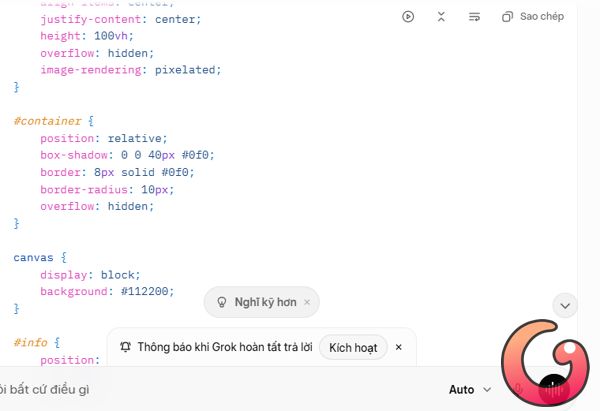
Bước 3: Bạn hãy sao chép đoạn code trên thành file html rồi click chuột phải vào game đó và chọn Open With/Google Chrome
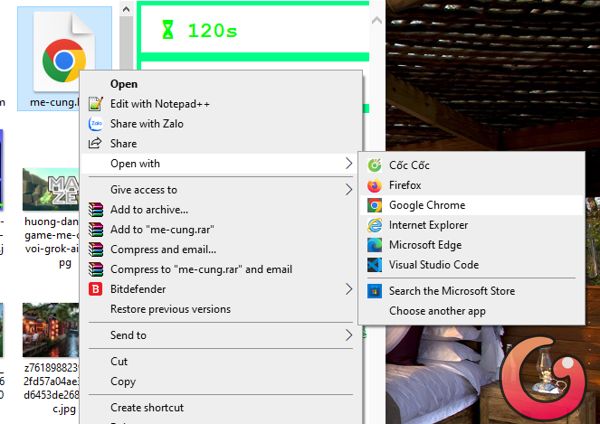
Bước 4: Sau khi mở lên chơi thử, bạn có thể ra lệnh cho Grok AI chỉnh sửa lại và nâng cấp độ khó cho game với một vài Prompt như sau
thanh menu che mất góc trên bên trái của mê cung, thay chữ nhánh bằng level, đổi sang font chữ chuẩn tiếng Việt, nên để thời gian đếm xuôi hay đếm ngược sẽ hấp dẫn hơn nhỉfont tiếng việt vẫn lỗi, đổi nền bên ngoài tương phản với mê cung sẽ nổi hơn, các mục như chơi lại hay level vẫn che 1 số đoạn của mê cung, nghiên cứu chuyển ra chỗ dễ nhìn hơn, đổi hình nhân vật di chuyển trong mê cung đẹp hơn. Khi hết thời gian, hiển thị luôn trên màn hình (bỏ popup)1 số font chữ vẫn xấu, nếu thêm con mèo vào mê cung có hấp dẫn hơn không, nếu bổ sung mèo thì thêm nút dừng chơi,Bước 5: Khi đã thấy game chạy ổn, bạn hãy sao chép đoạn code dưới đây về máy tính để chơi
<!DOCTYPE html>
<html lang="vi">
<head>
    <meta charset="UTF-8">
    <meta name="viewport" content="width=device-width, initial-scale=1.0, maximum-scale=1.0, user-scalable=no">
    <title>🌀 MÊ CUNG - TÌM LỐI RA</title>
    <style>
        @import url('https://fonts.googleapis.com/css2?family=Press+Start+2P&family=VT323&display=swap');

        body {
            margin: 0;
            padding: 0;
            background: radial-gradient(circle at center, #001a00, #000000);
            color: #0f0;
            font-family: 'VT323', monospace;
            display: flex;
            flex-direction: column;
            align-items: center;
            justify-content: center;
            min-height: 100vh;
            overflow: hidden;
        }

        #top-hud {
            width: 820px;
            display: flex;
            justify-content: space-between;
            align-items: center;
            margin-bottom: 12px;
            z-index: 30;
            gap: 8px;
        }

        .hud-item {
            background: rgba(0, 40, 20, 0.95);
            padding: 10px 22px;
            border: 5px solid #0f8;
            border-radius: 12px;
            font-size: 23px;
            font-weight: bold;
            text-shadow: 0 0 15px #0f8;
            box-shadow: 0 0 25px #0f8;
            display: flex;
            align-items: center;
            gap: 10px;
            white-space: nowrap;
        }

        #container {
            position: relative;
            box-shadow: 0 0 80px #0f8, 0 0 150px #0f8;
            border: 15px solid #0f8;
            border-radius: 22px;
            overflow: hidden;
            background: #000;
        }

        canvas {
            display: block;
            image-rendering: pixelated;
        }

        #win, #timeout {
            position: absolute;
            top: 50%;
            left: 50%;
            transform: translate(-50%, -50%);
            width: 540px;
            background: rgba(0, 25, 0, 0.97);
            border: 10px solid #0f8;
            border-radius: 20px;
            padding: 35px 40px;
            text-align: center;
            z-index: 100;
            display: none;
            color: #0f0;
            box-shadow: 0 0 120px #0f8;
            font-family: 'VT323', monospace;
        }

        #win h1 {
            font-family: 'Press Start 2P', sans-serif;
            font-size: 36px;
            margin: 0 0 20px 0;
            text-shadow: 0 0 25px #0f8;
        }

        button {
            font-family: 'VT323', monospace;
            margin: 15px 10px;
            padding: 16px 34px;
            font-size: 19px;
            border: 6px solid #0f8;
            border-radius: 12px;
            cursor: pointer;
            transition: all 0.3s;
        }

        button:hover {
            background: #0f8;
            color: #001100;
            transform: scale(1.1);
        }

        .btn-red {
            background: #330000;
            color: #ff0;
            border-color: #ff0;
        }

        .instructions {
            margin-top: 25px;
            color: #0a0;
            font-size: 15px;
            text-align: center;
            line-height: 1.6;
            max-width: 820px;
            font-family: 'VT323', monospace;
        }

        .pause-btn {
            background: rgba(0, 40, 20, 0.95);
            padding: 10px 24px;
            border: 5px solid #0f8;
            border-radius: 12px;
            font-size: 22px;
            font-weight: bold;
            color: #0f8;
            cursor: pointer;
            text-shadow: 0 0 15px #0f8;
            box-shadow: 0 0 25px #0f8;
        }
    </style>
</head>
<body>
    <div id="top-hud">
        <div class="hud-item">⏳ <span id="timer">120</span>s</div>
        <div class="hud-item">LEVEL <span id="level">1</span></div>
        <div onclick="restartGame()" class="hud-item" style="cursor:pointer">🔄 CHƠI LẠI (R)</div>
        <div onclick="togglePause()" class="pause-btn">⏸ DỪNG CHƠI</div>
    </div>

    <div id="container">
        <canvas id="canvas" width="800" height="500"></canvas>

        <div id="win">
            <h1>🏆 CHÚC MỪNG!</h1>
            <p style="font-size:24px; margin:15px 0;">Bạn đã hoàn thành Level <span id="win-level" style="color:#ff0">1</span></p>
            <p style="font-size:24px; color:#ff0;">Thời gian còn lại: <span id="win-time">95</span>s</p>
            <button onclick="nextLevel()">LEVEL TIẾP THEO →</button>
            <button onclick="restartGame()" class="btn-red">CHƠI LẠI TỪ ĐẦU</button>
        </div>

        <div id="timeout">
            <h1 style="color:#f80;">⏰ HẾT THỜI GIAN!</h1>
            <p style="font-size:23px; margin:20px 0;">Chuột nhỏ không kịp thoát!</p>
            <button onclick="restartCurrentLevel()">THỬ LẠI LEVEL NÀY</button>
            <button onclick="restartGame()" class="btn-red">CHƠI LẠI TỪ ĐẦU</button>
        </div>
    </div>

    <div class="instructions">
        <strong>MÁY TÍNH:</strong> Phím mũi tên hoặc WASD • P: Dừng chơi<br>
        <strong>ĐIỆN THOẠI:</strong> Vuốt màn hình để di chuyển<br><br>
        Tránh lửa 🔥 • Độ khó tăng theo level • Luôn có đường đi
    </div>

    <script>
        const canvas = document.getElementById('canvas');
        const ctx = canvas.getContext('2d');

        const COLS = 16;
        const ROWS = 10;
        const CELL_SIZE = 50;

        let grid = [];
        let player = { x: 0, y: 0 };
        let fires = [];
        let timeLeft = 120;
        let timerInterval = null;
        let gameOver = false;
        let paused = false;
        let currentLevel = 1;

        class Cell {
            constructor(x, y) {
                this.x = x;
                this.y = y;
                this.walls = { top: true, right: true, bottom: true, left: true };
                this.visited = false;
            }
        }

        function generateMaze() {
            grid = [];
            for (let y = 0; y < ROWS; y++) {
                const row = [];
                for (let x = 0; x < COLS; x++) row.push(new Cell(x, y));
                grid.push(row);
            }

            let current = grid[0][0];
            current.visited = true;
            let stack = [current];

            while (stack.length > 0) {
                current = stack[stack.length - 1];
                let neighbors = [];
                const dirs = [
                    {dx:0,dy:-1,wall:'top',opp:'bottom'},
                    {dx:1,dy:0,wall:'right',opp:'left'},
                    {dx:0,dy:1,wall:'bottom',opp:'top'},
                    {dx:-1,dy:0,wall:'left',opp:'right'}
                ];
                for (let d of dirs) {
                    const nx = current.x + d.dx;
                    const ny = current.y + d.dy;
                    if (nx >= 0 && nx < COLS && ny >= 0 && ny < ROWS && !grid[ny][nx].visited) {
                        neighbors.push({cell: grid[ny][nx], dir: d});
                    }
                }
                if (neighbors.length > 0) {
                    const nextInfo = neighbors[Math.floor(Math.random() * neighbors.length)];
                    current.walls[nextInfo.dir.wall] = false;
                    nextInfo.cell.walls[nextInfo.dir.opp] = false;
                    nextInfo.cell.visited = true;
                    stack.push(nextInfo.cell);
                } else {
                    stack.pop();
                }
            }

            fires = [];

            // Chỉ có lửa, từ Level 4 trở lên
            if (currentLevel >= 4) {
                const fireCount = Math.min(7 + currentLevel - 4, 12);
                for (let i = 0; i < fireCount; i++) {
                    let placed = false;
                    for (let attempt = 0; attempt < 120 && !placed; attempt++) {
                        const fx = Math.floor(Math.random() * COLS);
                        const fy = Math.floor(Math.random() * ROWS);
                        if ((fx === 0 && fy === 0) || (fx === COLS-1 && fy === ROWS-1) || isFireAt(fx, fy)) continue;
                        fires.push({x: fx, y: fy});
                        if (hasPath()) placed = true;
                        else fires.pop();
                    }
                }
            }
        }

        function isFireAt(x, y) {
            return fires.some(f => f.x === x && f.y === y);
        }

        function hasPath() {
            const visited = Array.from({length: ROWS}, () => Array(COLS).fill(false));
            const queue = [{x: 0, y: 0}];
            visited[0][0] = true;

            const dirs = [
                {dx:0,dy:-1,wall:'top'},
                {dx:1,dy:0,wall:'right'},
                {dx:0,dy:1,wall:'bottom'},
                {dx:-1,dy:0,wall:'left'}
            ];

            while (queue.length > 0) {
                const curr = queue.shift();
                if (curr.x === COLS-1 && curr.y === ROWS-1) return true;

                for (let d of dirs) {
                    const nx = curr.x + d.dx;
                    const ny = curr.y + d.dy;
                    if (nx < 0 || nx >= COLS || ny < 0 || ny >= ROWS || visited[ny][nx] || isFireAt(nx, ny)) continue;
                    if (!grid[curr.y][curr.x].walls[d.wall]) {
                        visited[ny][nx] = true;
                        queue.push({x: nx, y: ny});
                    }
                }
            }
            return false;
        }

        function draw() {
            ctx.fillStyle = '#0a1a0a';
            ctx.fillRect(0, 0, canvas.width, canvas.height);

            ctx.strokeStyle = '#0f8';
            ctx.lineWidth = 8;
            for (let y = 0; y < ROWS; y++) {
                for (let x = 0; x < COLS; x++) {
                    const cell = grid[y][x];
                    const px = x * CELL_SIZE;
                    const py = y * CELL_SIZE;
                    if (cell.walls.top)    { ctx.beginPath(); ctx.moveTo(px, py); ctx.lineTo(px + CELL_SIZE, py); ctx.stroke(); }
                    if (cell.walls.right)  { ctx.beginPath(); ctx.moveTo(px + CELL_SIZE, py); ctx.lineTo(px + CELL_SIZE, py + CELL_SIZE); ctx.stroke(); }
                    if (cell.walls.bottom) { ctx.beginPath(); ctx.moveTo(px, py + CELL_SIZE); ctx.lineTo(px + CELL_SIZE, py + CELL_SIZE); ctx.stroke(); }
                    if (cell.walls.left)   { ctx.beginPath(); ctx.moveTo(px, py); ctx.lineTo(px, py + CELL_SIZE); ctx.stroke(); }
                }
            }

            // Lửa
            for (let f of fires) {
                ctx.font = '42px Arial';
                ctx.fillText('🔥', f.x * CELL_SIZE + CELL_SIZE/2, f.y * CELL_SIZE + CELL_SIZE/2 + 6);
            }

            // Cờ đích
            const gx = (COLS-1)*CELL_SIZE + CELL_SIZE/2;
            const gy = (ROWS-1)*CELL_SIZE + CELL_SIZE/2;
            ctx.fillStyle = '#ff0';
            ctx.beginPath(); ctx.arc(gx, gy, CELL_SIZE*0.37, 0, Math.PI*2); ctx.fill();
            ctx.fillStyle = '#000';
            ctx.font = 'bold 38px Arial';
            ctx.textAlign = 'center';
            ctx.textBaseline = 'middle';
            ctx.fillText('🏁', gx, gy);

            // Chuột
            ctx.font = '46px Arial';
            ctx.fillText('🐭', player.x * CELL_SIZE + CELL_SIZE/2, player.y * CELL_SIZE + CELL_SIZE/2 + 6);
        }

        function canMove(dx, dy) {
            if (gameOver || paused) return false;
            const nx = player.x + dx;
            const ny = player.y + dy;
            if (nx < 0 || nx >= COLS || ny < 0 || ny >= ROWS || isFireAt(nx, ny)) return false;

            const cell = grid[player.y][player.x];
            if (dx === 1 && cell.walls.right) return false;
            if (dx === -1 && cell.walls.left) return false;
            if (dy === 1 && cell.walls.bottom) return false;
            if (dy === -1 && cell.walls.top) return false;
            return true;
        }

        function move(dx, dy) {
            if (!canMove(dx, dy)) return;
            player.x += dx;
            player.y += dy;
            draw();

            if (player.x === COLS-1 && player.y === ROWS-1) {
                gameOver = true;
                clearInterval(timerInterval);
                document.getElementById('win-level').textContent = currentLevel;
                document.getElementById('win-time').textContent = timeLeft;
                document.getElementById('win').style.display = 'block';
            }
        }

        function startTimer() {
            timeLeft = Math.max(50, 150 - currentLevel * 11);
            document.getElementById('timer').textContent = timeLeft;
            clearInterval(timerInterval);
            timerInterval = setInterval(() => {
                if (!gameOver && !paused && timeLeft > 0) {
                    timeLeft--;
                    document.getElementById('timer').textContent = timeLeft;
                }
                if (timeLeft <= 0 && !gameOver) {
                    clearInterval(timerInterval);
                    gameOver = true;
                    document.getElementById('timeout').style.display = 'block';
                }
            }, 1000);
        }

        function togglePause() {
            if (gameOver) return;
            paused = !paused;
            const btn = document.querySelector('.pause-btn');
            btn.textContent = paused ? '▶ TIẾP TỤC' : '⏸ DỪNG CHƠI';
        }

        function restartGame() {
            gameOver = false;
            paused = false;
            currentLevel = 1;
            document.getElementById('level').textContent = currentLevel;
            document.getElementById('win').style.display = 'none';
            document.getElementById('timeout').style.display = 'none';
            document.querySelector('.pause-btn').textContent = '⏸ DỪNG CHƠI';
            player = { x: 0, y: 0 };
            generateMaze();
            draw();
            startTimer();
        }

        function restartCurrentLevel() {
            gameOver = false;
            paused = false;
            document.getElementById('timeout').style.display = 'none';
            document.querySelector('.pause-btn').textContent = '⏸ DỪNG CHƠI';
            player = { x: 0, y: 0 };
            generateMaze();
            draw();
            startTimer();
        }

        function nextLevel() {
            gameOver = false;
            paused = false;
            currentLevel++;
            document.getElementById('level').textContent = currentLevel;
            document.getElementById('win').style.display = 'none';
            document.querySelector('.pause-btn').textContent = '⏸ DỪNG CHƠI';
            player = { x: 0, y: 0 };
            generateMaze();
            draw();
            startTimer();
        }

        window.addEventListener('keydown', e => {
            if (gameOver || paused) return;
            switch(e.key.toLowerCase()) {
                case 'arrowup': case 'w': move(0, -1); break;
                case 'arrowdown': case 's': move(0, 1); break;
                case 'arrowleft': case 'a': move(-1, 0); break;
                case 'arrowright': case 'd': move(1, 0); break;
                case 'r': restartGame(); break;
                case 'p': togglePause(); break;
            }
        });

        let tsX = 0, tsY = 0;
        canvas.addEventListener('touchstart', e => {
            tsX = e.changedTouches[0].screenX;
            tsY = e.changedTouches[0].screenY;
        }, {passive: true});

        canvas.addEventListener('touchend', e => {
            if (gameOver || paused) return;
            const dx = e.changedTouches[0].screenX - tsX;
            const dy = e.changedTouches[0].screenY - tsY;
            if (Math.abs(dx) > Math.abs(dy) && Math.abs(dx) > 40) move(dx > 0 ? 1 : -1, 0);
            else if (Math.abs(dy) > 40) move(0, dy > 0 ? 1 : -1);
        }, {passive: true});

        function init() {
            canvas.width = COLS * CELL_SIZE;
            canvas.height = ROWS * CELL_SIZE;
            generateMaze();
            player = { x: 0, y: 0 };
            draw();
            startTimer();
        }

        window.onload = init;
    </script>
</body>
</html>Bài viết liên quan


Bài viết mới nhất



Game PC
-

Tất cả những gì bạn cần biết về các Brainrots trong bản cập nhật Valentine của Steal a Brainrot
-
Thông tin đầy đủ các loại quân trong AOE 1
-
The Forge: Hướng dẫn khai thác Uranium
-
Cách tự sửa lỗi game Liên Minh Huyền Thoại
-
Hướng dẫn chi tiết các bước tạo tài khoản và tải LOL PBE
-
Blox Fruits: Hướng dẫn thu thập tất cả Quả Mọng