TOP Game
  Game Mobile
  Game PC
  Code game
  Cách chơi Game
  Mẹo vặt
  Anime Manga
  Liên Minh Huyền Thoại
  Đấu Trường Chân Lý
  Call Of Duty
  Coin Master
 Hướng dẫn làm game Sudoku với Grok AI
Nếu bạn nghĩ làm game là chuyên môn chỉ dành cho các lập trình viên chuyên nghiệp, thì bài viết này có thể sẽ khiến bạn bất ngờ. Chỉ với một ý tưởng quen thuộc như Sudoku và sự hỗ trợ từ Grok AI là bạn đã có thể tự tay tạo ra một trò chơi của riêng mình.
Cách làm game Sudoku với Grok AI
Bước 1: Trước tiên, bạn hãy mở ứng dụng Grok AI lên rồi nhập Prompt sau để nó tạo game Sudoku giúp bạn
hãy tạo giúp tôi game sudoko màn hình ngang chơi trên máy tính và điện thoại, gồm có 1 bảng diện tích 9x9, được chia thành từng khối nhỏ 3x3 và các số từ 1 đến 9 để người chơi điền vào bảngBước 2: Sau đó, Grok AI sẽ phân tích Prompt rồi tạo cho bạn đoạn code hoàn chỉnh, bạn chỉ cần sao chép đoạn code này về máy tính rồi lưu thành file html.
<!DOCTYPE html>
<html lang="vi">
<head>
    <meta charset="UTF-8">
    <meta name="viewport" content="width=device-width, initial-scale=1.0">
    <title>Sudoku</title>
    <style>
        * { margin: 0; padding: 0; box-sizing: border-box; }
        body {
            font-family: Arial, sans-serif;
            background: linear-gradient(135deg, #667eea, #764ba2);
            height: 100vh;
            overflow: hidden;
            display: flex;
            justify-content: center;
            align-items: center;
        }
        .game-container {
            width: 920px;
            height: 520px;
            background: white;
            border-radius: 18px;
            box-shadow: 0 12px 45px rgba(0,0,0,0.35);
            overflow: hidden;
            display: flex;
        }
        .board-side {
            flex: 2;
            display: flex;
            flex-direction: column;
            justify-content: center;
            align-items: center;
            padding: 35px 15px 20px;   /* Đẩy bảng xuống nhiều hơn */
            background: #f8f9fa;
        }
        .right-side {
            flex: 1.15;
            background: #ffffff;
            padding: 25px 25px 20px;   /* Đẩy sang trái một chút */
            display: flex;
            flex-direction: column;
            align-items: center;
        }

        .title {
            font-size: 2rem;
            font-weight: bold;
            color: #222;
            margin-bottom: 12px;
        }

        .controls {
            margin-top: 25px;
            display: flex;
            gap: 10px;
            justify-content: center;
        }
        button {
            padding: 11px 20px;
            font-size: 15.5px;
            font-weight: bold;
            border: none;
            border-radius: 8px;
            cursor: pointer;
            min-width: 95px;
        }
        #new-game { background: #4CAF50; color: white; }
        #undo     { background: #FF9800; color: white; }
        #clear    { background: #f44336; color: white; }

        .grid {
            display: grid;
            grid-template-columns: repeat(9, 1fr);
            gap: 2.5px;
            background: #222;
            padding: 3px;
            border: 3px solid #222;
            border-radius: 10px;
            max-width: 415px;
        }
        .cell {
            width: 42px;
            height: 42px;
            font-size: 21px;
            display: flex;
            align-items: center;
            justify-content: center;
            background: white;
            border: 1px solid #999;
            cursor: pointer;
        }
        .cell.fixed {
            background: #f0f0f0;
            color: #000;
            font-weight: bold;
        }
        .cell.user { color: #0066ff; }
        .cell.error { background: #ffe0e0; color: red; }
        .thick-right { border-right: 3px solid #222 !important; }
        .thick-bottom { border-bottom: 3px solid #222 !important; }

        .number-pad {
            display: grid;
            grid-template-columns: repeat(3, 1fr);
            gap: 10px;
            width: 100%;
            max-width: 260px;
        }
        .num-btn {
            font-size: 28px;
            padding: 16px 6px;
            background: #e3f2fd;
            border: 2px solid #90caf9;
            border-radius: 10px;
            cursor: pointer;
        }
        .num-btn:active {
            background: #81d4fa;
            transform: scale(0.92);
        }

        #message {
            margin-top: 12px;
            font-size: 15px;
            font-weight: bold;
            min-height: 26px;
            text-align: center;
        }
    </style>
</head>
<body>
    <div class="game-container">
        <!-- Bên trái: Bảng + Nút -->
        <div class="board-side">
            <div id="grid" class="grid"></div>

            <div class="controls">
                <button id="new-game">Chơi Mới</button>
                <button id="undo">Undo</button>
                <button id="clear">Xóa</button>
            </div>

            <div id="message"></div>
        </div>

        <!-- Bên phải: Tiêu đề + Bàn phím -->
        <div class="right-side">
            <div class="title">🎮 Sudoku</div>

            <h2 style="margin-bottom: 15px; color: #333; font-size: 1.35rem;">Chọn số</h2>
            <div class="number-pad" id="number-pad"></div>

            <p style="margin-top: 25px; color: #555; text-align: center; font-size: 14px; line-height: 1.4;">
                Nhấn vào ô trống rồi chọn số<br>
                Hoặc dùng bàn phím máy tính (1-9)
            </p>
        </div>
    </div>

    <script>
        // Phần JavaScript giữ nguyên (để game chạy được)
        let solution = [];
        let puzzle = [];
        let userBoard = [];
        let selectedCell = null;
        let moveHistory = [];

        function isValid(board, row, col, num) {
            for (let x = 0; x < 9; x++) if (board[row][x] === num || board[x][col] === num) return false;
            const sr = Math.floor(row/3)*3, sc = Math.floor(col/3)*3;
            for (let i = 0; i < 3; i++)
                for (let j = 0; j < 3; j++)
                    if (board[sr+i][sc+j] === num) return false;
            return true;
        }

        function solveSudoku(board) {
            for (let r = 0; r < 9; r++) {
                for (let c = 0; c < 9; c++) {
                    if (board[r][c] === 0) {
                        for (let n = 1; n <= 9; n++) {
                            if (isValid(board, r, c, n)) {
                                board[r][c] = n;
                                if (solveSudoku(board)) return true;
                                board[r][c] = 0;
                            }
                        }
                        return false;
                    }
                }
            }
            return true;
        }

        function generatePuzzle() {
            let board = Array.from({length:9}, () => Array(9).fill(0));
            for (let i = 0; i < 25; i++) {
                let r = Math.floor(Math.random()*9);
                let c = Math.floor(Math.random()*9);
                let n = Math.floor(Math.random()*9)+1;
                if (isValid(board,r,c,n)) board[r][c] = n;
            }
            let solved = JSON.parse(JSON.stringify(board));
            solveSudoku(solved);
            solution = solved;

            puzzle = JSON.parse(JSON.stringify(solved));
            let remove = 48;
            while (remove > 0) {
                let r = Math.floor(Math.random()*9);
                let c = Math.floor(Math.random()*9);
                if (puzzle[r][c] !== 0) {
                    puzzle[r][c] = 0;
                    remove--;
                }
            }
            userBoard = JSON.parse(JSON.stringify(puzzle));
            moveHistory = [];
        }

        function createGrid() {
            const grid = document.getElementById('grid');
            grid.innerHTML = '';
            for (let row = 0; row < 9; row++) {
                for (let col = 0; col < 9; col++) {
                    const cell = document.createElement('div');
                    cell.classList.add('cell');
                    if (col % 3 === 2 && col !== 8) cell.classList.add('thick-right');
                    if (row % 3 === 2 && row !== 8) cell.classList.add('thick-bottom');

                    if (puzzle[row][col] !== 0) {
                        cell.textContent = puzzle[row][col];
                        cell.classList.add('fixed');
                    } else {
                        cell.classList.add('user');
                    }

                    cell.dataset.row = row;
                    cell.dataset.col = col;

                    cell.addEventListener('click', () => {
                        if (selectedCell) selectedCell.style.backgroundColor = '';
                        selectedCell = cell;
                        cell.style.backgroundColor = '#e0f7fa';
                    });

                    grid.appendChild(cell);
                }
            }
        }

        function updateCell(row, col, value) {
            if (puzzle[row][col] !== 0) return;
            moveHistory.push({row, col, oldValue: userBoard[row][col]});
            userBoard[row][col] = value;
            const cell = document.querySelector(`.cell[data-row="${row}"][data-col="${col}"]`);
            if (cell) cell.textContent = value || '';
            checkConflicts(row, col);
        }

        function checkConflicts(row, col) {
            document.querySelectorAll('.cell').forEach(c => c.classList.remove('error'));
            const val = userBoard[row][col];
            if (!val) return;

            for (let i = 0; i < 9; i++) {
                if (i !== col && userBoard[row][i] === val) markError(row, i);
                if (i !== row && userBoard[i][col] === val) markError(i, col);
            }
            const br = Math.floor(row/3)*3, bc = Math.floor(col/3)*3;
            for (let i = 0; i < 3; i++) {
                for (let j = 0; j < 3; j++) {
                    let r = br + i, c = bc + j;
                    if ((r !== row || c !== col) && userBoard[r][c] === val) markError(r, c);
                }
            }
        }

        function markError(r, c) {
            const cell = document.querySelector(`.cell[data-row="${r}"][data-col="${c}"]`);
            if (cell) cell.classList.add('error');
        }

        function createNumberPad() {
            const pad = document.getElementById('number-pad');
            pad.innerHTML = '';
            for (let i = 1; i <= 9; i++) {
                const btn = document.createElement('button');
                btn.classList.add('num-btn');
                btn.textContent = i;
                btn.addEventListener('click', () => {
                    if (selectedCell && !selectedCell.classList.contains('fixed')) {
                        const r = parseInt(selectedCell.dataset.row);
                        const c = parseInt(selectedCell.dataset.col);
                        updateCell(r, c, i);
                    }
                });
                pad.appendChild(btn);
            }
        }

        document.getElementById('new-game').addEventListener('click', () => {
            generatePuzzle();
            createGrid();
            document.getElementById('message').innerHTML = '';
        });

        document.getElementById('undo').addEventListener('click', () => {
            if (moveHistory.length === 0) return;
            const last = moveHistory.pop();
            userBoard[last.row][last.col] = last.oldValue;
            const cell = document.querySelector(`.cell[data-row="${last.row}"][data-col="${last.col}"]`);
            if (cell) cell.textContent = last.oldValue || '';
            checkConflicts(last.row, last.col);
        });

        document.getElementById('clear').addEventListener('click', () => {
            if (!selectedCell || selectedCell.classList.contains('fixed')) return;
            const r = parseInt(selectedCell.dataset.row);
            const c = parseInt(selectedCell.dataset.col);
            updateCell(r, c, 0);
        });

        generatePuzzle();
        createGrid();
        createNumberPad();

        document.addEventListener('keydown', e => {
            if (!selectedCell || selectedCell.classList.contains('fixed')) return;
            const r = parseInt(selectedCell.dataset.row);
            const c = parseInt(selectedCell.dataset.col);

            if (e.key >= '1' && e.key <= '9') updateCell(r, c, parseInt(e.key));
            if (e.key === 'Backspace' || e.key === 'Delete') updateCell(r, c, 0);
        });
    </script>
</body>
</html>
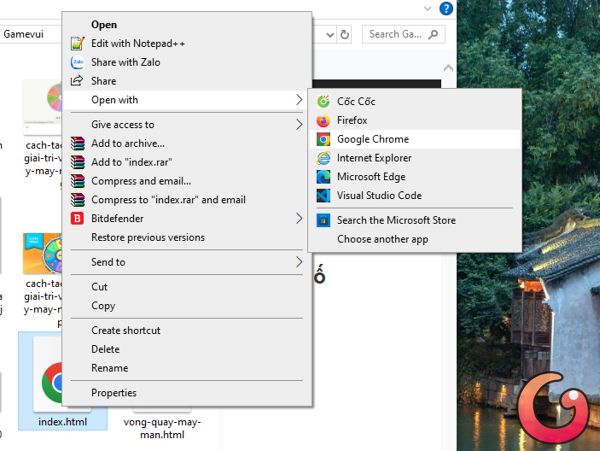
Bước 3: Bạn hãy click chuột phải vào file html vừa lưu ở trên rồi chọn Open With/Google Chrome để mở game lên chơi là xong
Hướng dẫn chơi Sudoku cơ bản
Khi chơi Sudoku, nhiệm vụ của bạn là hoàn thiện một bảng gồm 81 ô được chia thành 9 hàng và 9 cột bằng cách điền các số từ 1 đến 9 vào những ô còn trống. Mỗi ô đều nằm trong một hàng ngang, một cột dọc và một khối vuông 3x3.
Khi điền bất kỳ số nào vào ô, bạn cần đảm bảo rằng số đó chỉ xuất hiện một lần duy nhất trong từng hàng, từng cột và từng khối vuông 3x3 đó.
Giả sử bạn điền số 9 vào một ô, thì trong cùng hàng, cùng cột và cùng khối vuông 3x3 với ô đó sẽ không được xuất hiện thêm bất kỳ số 9 nào nữa.
Bài viết liên quan


Bài viết mới nhất
Game AI
-

Hướng dẫn làm game Ai là triệu phú bằng Claude AI
-
Hướng dẫn biến ảnh game thành nghệ thuật cắt giấy 3D
-
Hướng dẫn ghép ảnh game bằng Google Flow AI
-
Hướng dẫn làm ảnh phong cách tranh vẽ tay dễ thương với ChatGPT
-
Cách tạo game Bi-a 8 bóng bằng Meta AI
-
Cách làm game Vua Tiếng Việt bằng Grok AI